
Aviator is one of the games available inside the FD999 Game app. Unlike FD999 itself, Aviator is not a separate APK that users need to download independently. Users first install the FD999 Game APK, open the app, and then access Aviator from the games section available inside the platform.
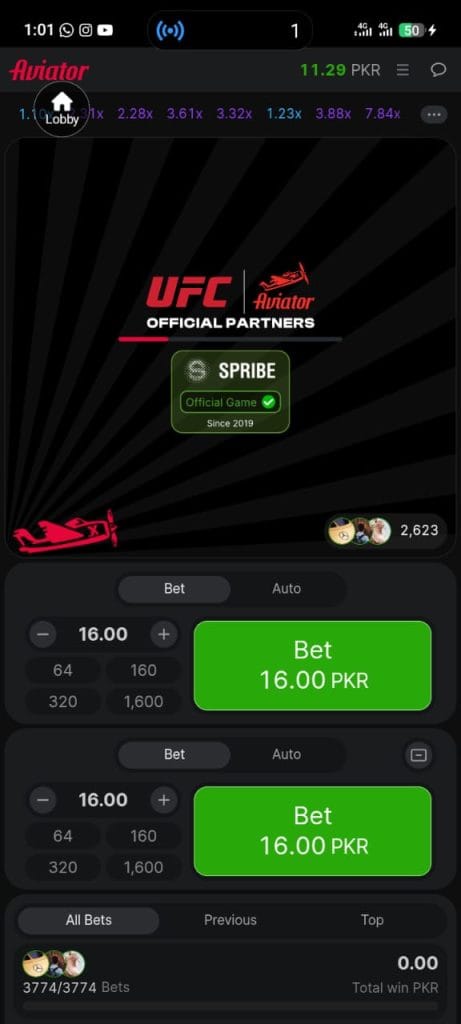
For users in Pakistan looking for information about Aviator in FD999, this guide explains where the game fits into the app, how its basic interface works, how to open it, and what to check before playing.
What Is Aviator in FD999 Game?
Aviator is a multiplier-style game available within the FD999 Game platform. Its interface is built around a flying plane and a multiplier that changes during each round.
The main idea is simple: the multiplier begins at a low value and can increase while the plane continues flying. The round ends at an unpredictable point, so users need to understand the game’s rules before deciding how they want to play.
Because Aviator is part of the FD999 app, users do not need a separate Aviator APK for the game itself.
How Aviator Game Works Inside FD999
After opening Aviator from the FD999 game lobby, users can see the main game interface and the current round.
A plane appears on the screen while a multiplier rises. The round eventually ends, and the displayed multiplier stops increasing.
The important part of the game is that the exact ending point of a round is not known in advance. Previous results should therefore not be treated as a reliable prediction of what will happen in the next round.
How to Open Aviator in FD999 Game
Opening Aviator is generally a straightforward process because the game is included within the main FD999 application.
Steps to Open Aviator
- Install the latest compatible FD999 Game APK on your Android device.
- Open the FD999 Game app.
- Complete registration or log in to your existing account.
- Enter the game lobby.
- Find Aviator in the available game list.
- Tap the Aviator game icon.
- Wait for the game screen to load.
- Read the available controls before starting a round.
The exact position of Aviator may change when the FD999 app receives an update, so the game can appear in a different category or location over time.
What You See on the Aviator Screen
The Aviator interface is usually easier to understand than many multi-feature games because the main activity is centered around the changing multiplier.
Depending on the current FD999 version, the screen may include:
- A flying-plane animation
- A live multiplier
- Round information
- Game controls
- Account or balance information
- Recent round information
The arrangement of these elements can change between versions, so users should focus on the labels and controls visible in their current app version.
Is Aviator a Separate App?
No. In the FD999 setup described on this website, Aviator is a game available inside FD999 Game.
The download is for the main FD999 APK. After installation, users open FD999 and then choose Aviator from the available games.
This distinction is important because searching for a separate Aviator APK can lead users to unrelated or modified files.
FD999 Game APK Is the Main Download
Users who want to access Aviator through FD999 should download the FD999 Game APK, rather than searching for an independent Aviator APK.
The main FD999 guide covers the complete APK process, including:
- FD999 APK download
- Installation
- Registration
- Login
- App updates
- Available games
Once the FD999 app is ready, Aviator can be opened from the game section when it is available in that version.
Aviator Game Gameplay Guide
Aviator is based around the increasing multiplier shown during a round.
The plane starts flying and the multiplier rises. The round can end before the multiplier reaches a value that a player expected, which makes each round uncertain.
Users should understand that a higher multiplier does not mean a future round must also reach a high value. Likewise, a sequence of low results does not automatically indicate that a high result is coming next.
The best way to approach the game is to understand its mechanics rather than rely on assumptions about patterns.
Can Previous Aviator Results Predict the Next Round?
Previous results can show what happened in earlier rounds, but they cannot provide a guaranteed prediction of the next outcome.
For example, seeing several short rounds in a row does not prove that the next round will last longer. In the same way, a very high multiplier in one round does not mean another high multiplier must follow immediately.
Every round should be treated as a separate event.
Why Users Find Aviator Easy to Understand
Aviator uses a relatively simple visual concept compared with games that have many menus or complicated rules.
The interface focuses on a few central elements:
- Plane movement
- Multiplier changes
- Round timing
- Game controls
This makes it easier for new users to understand the basic flow after spending some time with the interface.
However, a simple interface does not remove the uncertainty associated with chance-based gameplay.
Aviator in FD999 on Mobile
FD999 is designed around mobile access, so Aviator can be viewed from an Android device when the game is available in the installed version.
For a smoother experience, users should make sure that:
- The device has enough free storage.
- Android is compatible with the FD999 version.
- The internet connection is stable.
- Other heavy applications are closed when necessary.
- The installed APK came from a trusted source.
Performance can differ between devices, especially on older Android phones.
How to Find Aviator After an FD999 Update
Game positions can change after an application update.
If you cannot immediately find Aviator, check the main game lobby and any categories or menus inside FD999. A newer version may move the game to a different section or refresh the layout.
Also make sure that the app is fully updated and has loaded its current game list.
Is Aviator Safe to Play Through FD999?
The first safety step is making sure that the FD999 APK itself comes from a trusted source.
Users should avoid modified APK files, unknown repackaged applications, and downloads that request unusual permissions.
It is also useful to keep Android security features enabled and review installation warnings rather than ignoring them.
The safety of an application depends on the source, file integrity, device security, and the permissions requested during installation.
Responsible Use of Aviator
Aviator involves chance, so results are not guaranteed.
Users should not treat the game as a fixed-income method or assume that a particular strategy can guarantee a profit. Anyone choosing to play should understand the risks and only use amounts they can afford to lose.
Taking breaks and setting personal limits can also help keep gaming from becoming difficult to manage.
Common Aviator Game Issues in FD999
Aviator is not visible
The game may have been moved to another section after an FD999 update. Check the game lobby and available categories first.
Aviator does not load
Check your internet connection, restart the application, and make sure you are using a compatible version of FD999.
FD999 shows an outdated game list
Check whether a newer FD999 APK version is available and compare it with the version currently installed on your device.
The app closes while opening Aviator
Restart the phone, check available storage, and make sure the installed FD999 version supports your Android device.
Frequently Asked Questions About Aviator in FD999
Is Aviator a separate APK?
No. In the FD999 setup, Aviator is a game available inside the main FD999 Game app. The APK download is for FD999 itself.
How do I get Aviator in FD999?
Install the compatible FD999 Game APK, open the application, enter the game lobby, and look for Aviator in the available games.
Do I need a separate Aviator app?
No separate Aviator app is required when the game is available within your FD999 version.
Why can I not find Aviator in FD999?
The location of games can change after updates. Check the available game categories and make sure your FD999 app is current.
Can I predict Aviator results?
No method can reliably guarantee the result of a future round. Previous rounds should not be treated as a dependable prediction tool.
Does Aviator work on Android?
Aviator can be accessed on Android when it is included in a compatible FD999 Game version.
Is Aviator an earning game?
Aviator involves chance and should not be presented as a guaranteed earning method. Any money-based gameplay carries the possibility of loss.
Final Thoughts
Aviator is best understood as one of the games available inside FD999 Game, not as a separate APK that users need to download on its own.
To access it, users should first install the appropriate FD999 Game APK, open the application, and then locate Aviator inside the available game section. Keeping the app updated, using a trusted APK source, and understanding the uncertainty of each round are all important parts of using the game responsibly.
For the latest FD999 download, registration, login, and installation information, users can follow the main FD999 Game guide on this website.